LodgeMind THE LODGEMIND PLATFORM

The whole Heart of House.
A clearer working day.

Connect the daily work, planned maintenance, and operational records behind every guest stay. Built for the people keeping your hotel running.

START WITH THE WORK

One finding.
A clear next step.

A room is not cooling. A door closer needs attention. A recurring check is due. Keep the location, priority, assignment, and progress together so the next shift can pick up the record.

  • Room and hotel-area work orders
  • Room walks with operational follow-up
  • Recorded priorities, assignments, and statuses
  • Work history your team can return to
Live Demo
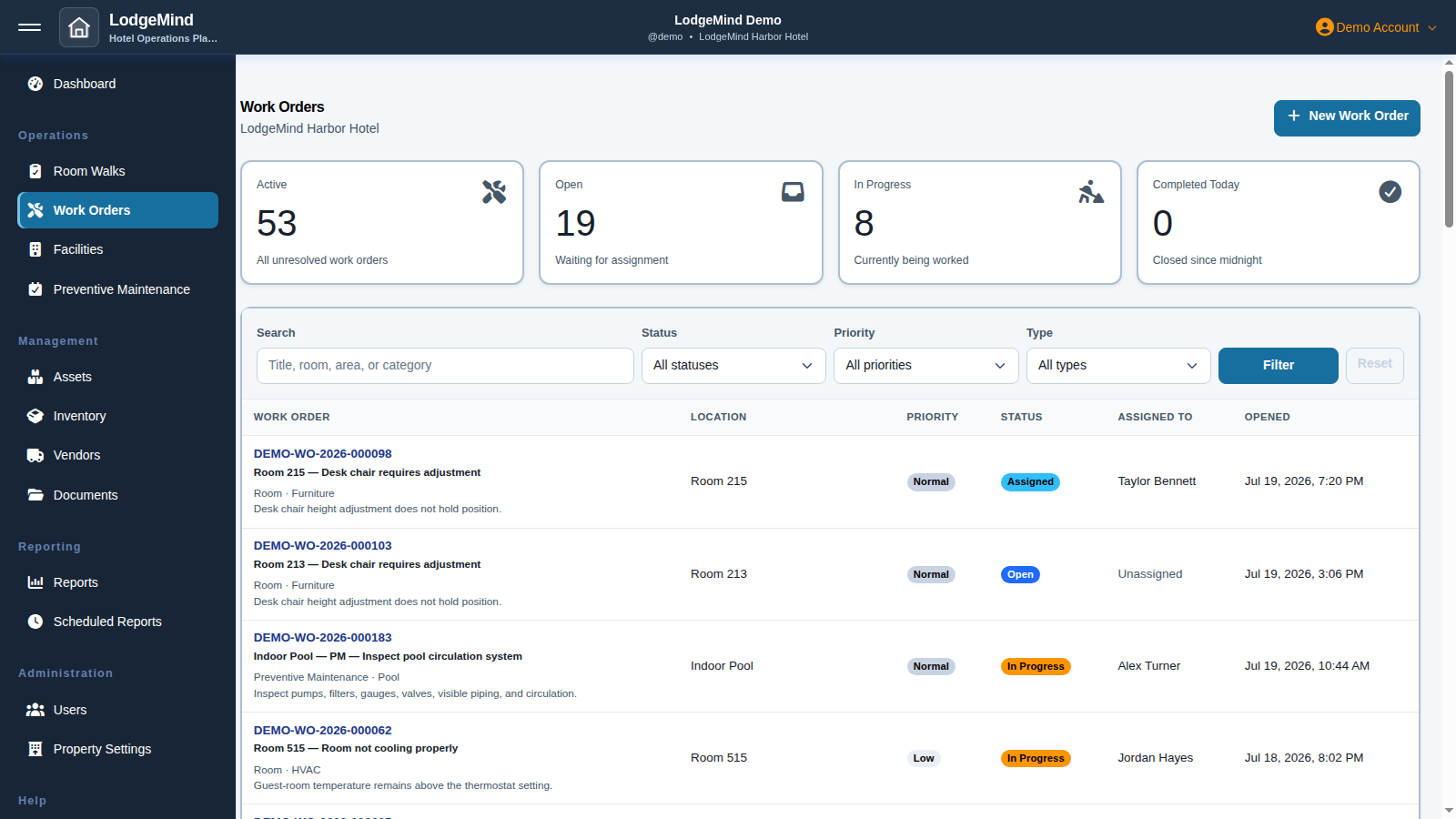
LodgeMind / Work ordersDEMO
The Gold work-order screen with room and facility tasks, priorities, assignments, and statuses
Work orders in the Gold demonstration. Sample hotel data.View full size
THE HEART OF HOUSE, IN ONE WORKSPACE

From the guest room.
To the systems behind it.

Daily repairs, room-by-room prevention, and the building systems that keep a hotel running. One place to see the work and find the record behind it.

01

Keep today moving.

Give every finding a place to go, and every shift a record to work from.

Work orders

Capture room and hotel-area issues with a priority, an owner, and a status. Keep the details with the work through completion.

Room walks

Bring room checks and repair findings into the same operational routine, with follow-up work your team can track.

Hotel areas

Organize maintenance across laundry, kitchens, public spaces, and other shared areas without mixing it into room work.
02

Make prevention a routine.

Keep recurring work visible, whether it covers one system or every active room.

PM Dashboard / Plans

Review recurring plans, next-due dates, overdue checks, and completion history in one maintenance workspace.

Room PM Campaigns

Coordinate a maintenance campaign across active rooms. Track room-by-room progress separately from routine repair work orders.

Inspections

Review scheduled PM checks and checklist guidance alongside related follow-up work. Open the underlying record when a check needs attention.

03

Know the systems behind the stay.

Bring the relevant equipment, maintenance schedules, and service work into focused views.

Equipment

Review recorded equipment condition, availability, and linked service work. Manage the underlying records in Assets.

Safety / Compliance

Keep safety maintenance schedules, open follow-up work, and available reference documents in view.

Pool / Mechanical

Review pool and building-system maintenance, related equipment, and service work together.

04

Keep the context close.

Support the work with the records, supplies, and information a hotel team needs.

Assets, inventory & vendors

Keep asset records, parts, supplies, and vendor reference information connected to your operational routine.

Documents

Give authorized team members a place for property procedures, equipment manuals, and supporting references.

Reports & dashboards

Review operational activity and maintenance progress. Keep imported historical work identifiable when reviewing the record.

Inspection checklists provide maintenance guidance, not signed inspection results. Safety records do not certify regulatory compliance. Pool / Mechanical covers maintenance records; it does not record water chemistry readings. Related records and actions depend on the user's property permissions.

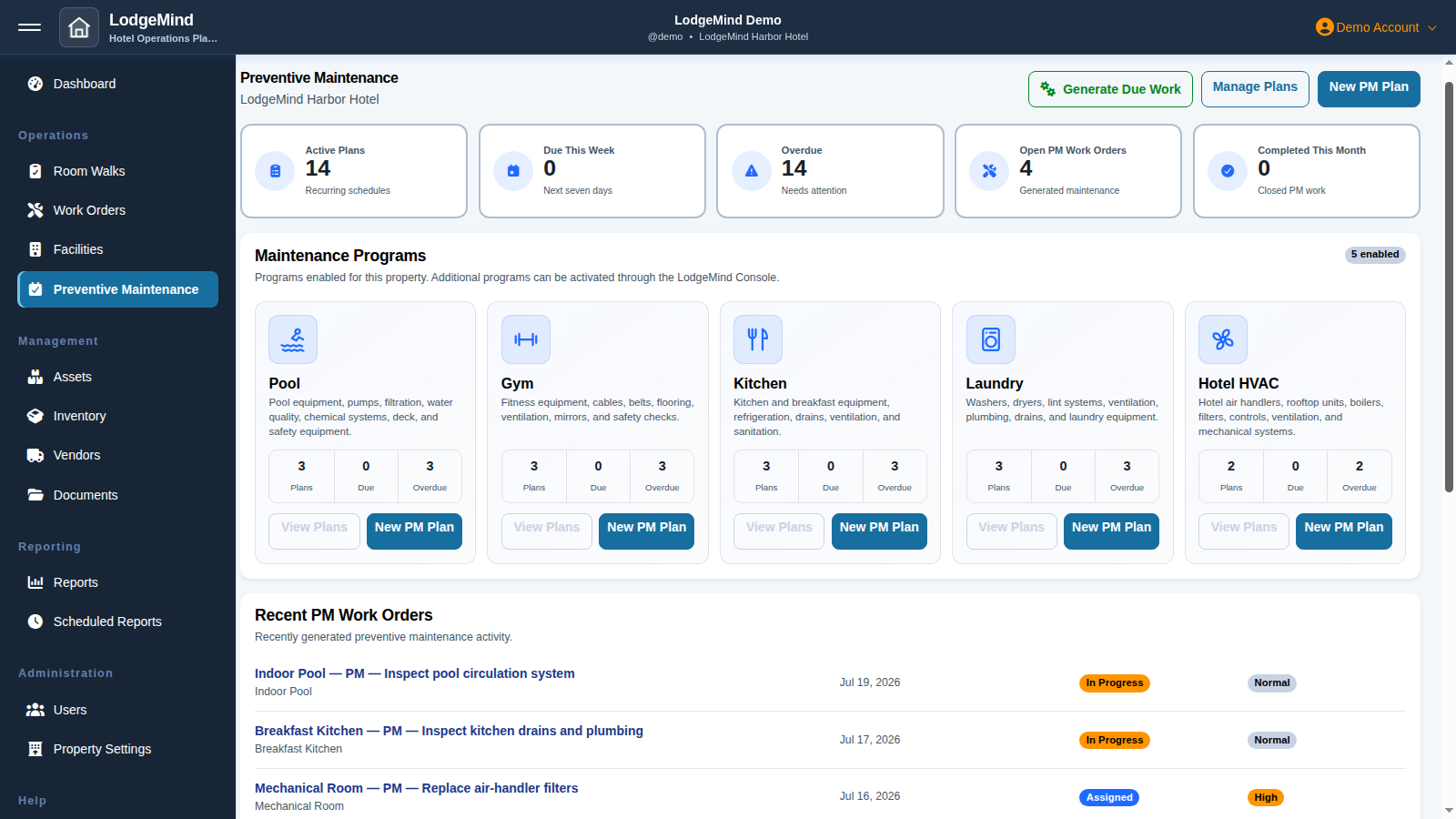
LodgeMind / Preventive maintenanceDEMO
The Gold preventive maintenance screen with plans for pool, gym, kitchen, laundry, and HVAC equipment
Preventive maintenance plans in Gold. Sample hotel data.View full size
PREVENTION, ROOM BY ROOM

A plan for the systems.
A campaign for the rooms.

Use PM plans for recurring maintenance schedules. Use Room PM Campaigns when the same maintenance task needs to reach every active room, with room-level progress kept separate from routine repairs.

  • Recurring PM schedules and next-due dates
  • Campaign instructions and target dates
  • Room-by-room campaign progress
  • Repair findings tracked as work orders
Explore Room PM Campaigns in Gold →
A SHARED OPERATIONAL PICTURE

Better handoffs start
with a useful record.

Review open work, maintenance schedules, equipment condition, and related hotel areas. Focused HOH views bring relevant records together without making the team search through unrelated work.

Property and module permissions control access. Historical imports remain identifiable as past records, so a review of hotel history has the context it needs.

Explore the workflows by role →
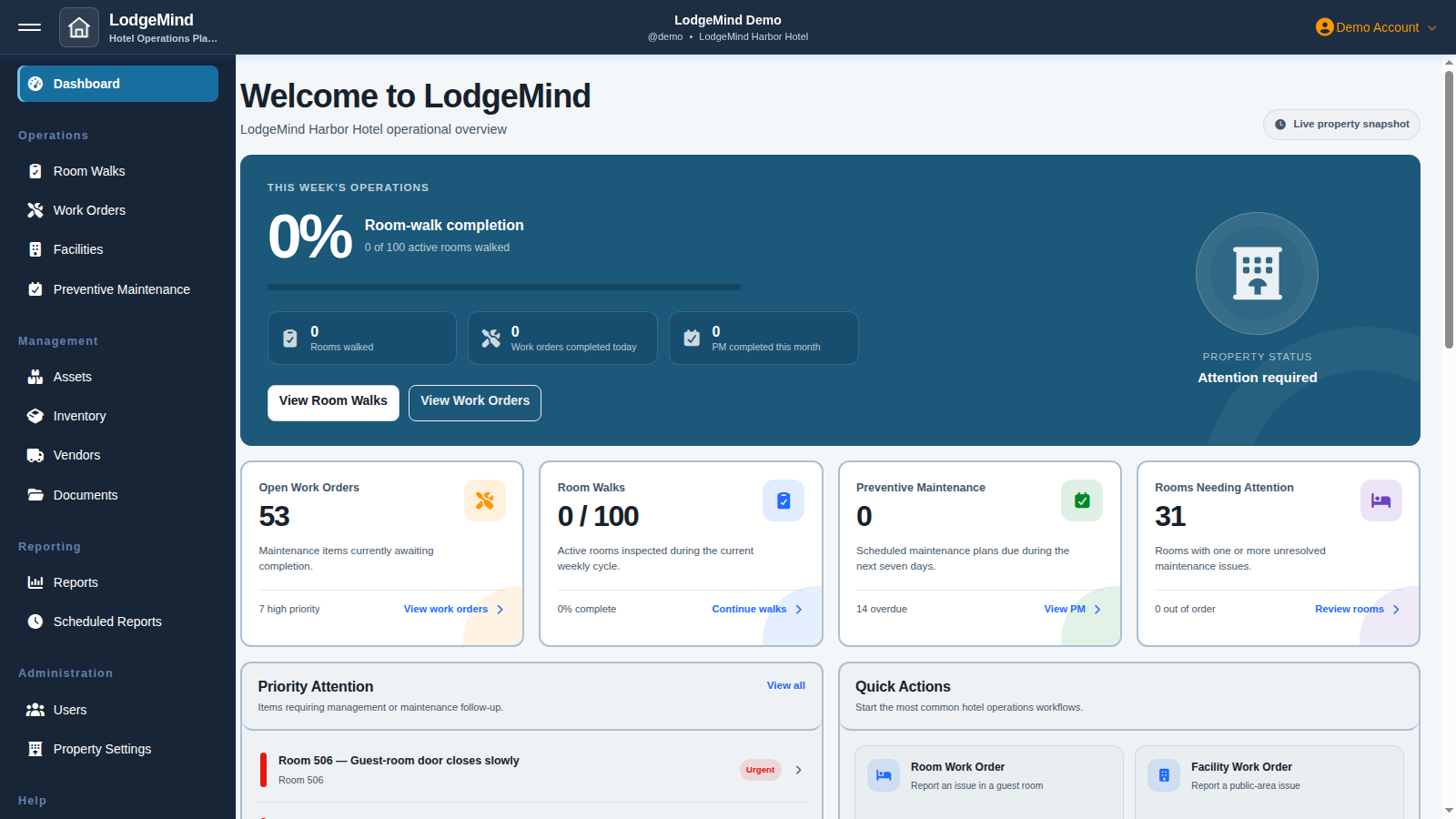
LodgeMind / DashboardDEMO
The Gold operational dashboard showing work orders, room walks, preventive maintenance, and rooms needing attention
An operational dashboard detail from Gold. Figures are sample data, not customer results.View full size
ONE SUBSCRIPTION

The full toolkit.
A practical start.

Every standard hotel subscription includes up to five users, onboarding, and business-hours email support. Choose $100 monthly or $1,000 annually.

View pricing
  • Work orders for rooms and facilities
  • Room walks and follow-up tracking
  • Preventive maintenance plans and Room PM Campaigns
  • Inspections and checklist guidance
  • Equipment, safety maintenance, and Pool / Mechanical views
  • Hotel-area management and asset records
  • Inventory and vendor management
  • Documents and property references
  • Operational reports and dashboards
  • Property and user administration
  • Browser access on desktop, tablet, and phone
  • Up to 5 user accounts per hotel
  • Property, room, and initial-user onboarding
  • Email support during business hours
SEE YOUR NEXT WORKDAY DIFFERENTLY

A clearer view.
A better next step.

Explore the actual workflows. See what fits your hotel.

Live DemoView Pricing Login instructions are on Gold’s sign-in page.